FAQ schema for small businesses: what it still does in 2026 (with copy-paste code)
Your customers ask the same few questions.
Do you charge for a quote? Which areas do you cover? Are you open Saturdays?
Answer them well on your website and you save phone calls. You also give Google and AI tools something clear to read.
FAQ schema is a small bit of code that labels those answers.
Here's what it still does, what it doesn't, and how to add it in 10 minutes.
The short version
- Google stopped showing FAQ drop-downs in search results on 7 May 2026.
- Google says its AI answers need no special code.
- So the code is a nice extra. The answers on your page are what really count.
- Write 5 clear answers. Make the code free with our FAQ schema generator, then check it with our schema checker.
Google stopped showing FAQ drop-downs in May 2026
Bad news first.
For years, FAQ schema could add little drop-down questions under your Google result.
That's gone. Google switched it off on 7 May 2026.
It's in Google's own update log. In June it removed the help pages too.
So adding FAQ code won't change how you look on Google.
What about AI?
There's no proof FAQ code gets you quoted by AI
You'll read that FAQ code "gets you into ChatGPT".
We can't back that up. We haven't seen anyone prove it, either.
Google is clear about its own AI answers.
Its guide to AI features says structured data "isn't required" and there's "no special schema.org markup you need to add".
We couldn't find anything from ChatGPT, Claude or Perplexity saying they use FAQ code either.
So why bother at all?
Clear answers on the page are what really count
AI tools and Google read your page's words.
If the answer is there, in plain sight, they can use it. If it isn't, no code will fix that.
FAQ schema just labels what's already there. "This is the question. This is the answer."
It's free, it's a recognised standard, and it takes 10 minutes. So we add it.
But answers come first.
The trouble is, most sites don't have them.
Most small business homepages don't answer questions yet
In our UK Small Business AI Readiness Study, we checked 3,671 homepages.
Only 4.6% had clear questions and answers on them.
Put another way, more than 9 in 10 homepages don't.
Professional firms did best, at 10.1%. Shops were at 3.5%, cafés and restaurants at 3.6%.
One honest catch. We only looked at homepages.
An FAQ page elsewhere on your site wasn't counted.
The figures and method are on our method page.
So if your site answers questions clearly, you're already ahead. Here's how.
Write 5 answers this week
Pick the questions you already get.
Think about the last 10 phone calls and emails. What did people ask?
Price, area, opening times, how long a job takes, and what to do next. Those are the big five for most businesses.
Answer in the first line.
Start with "Yes", "No" or the number. Then add one or two lines of detail.
Bad: "It depends on lots of things, so get in touch." Good: "Most boiler services cost £80 to £100. We tell you the exact price before we start."
One question, one answer.
Put each question on its own line, in bold or as a heading. Keep each answer short.
Only say what's true.
If you're not sure of a price, give a range. Never promise what you can't do.
Here's how we laid out our own FAQ page.
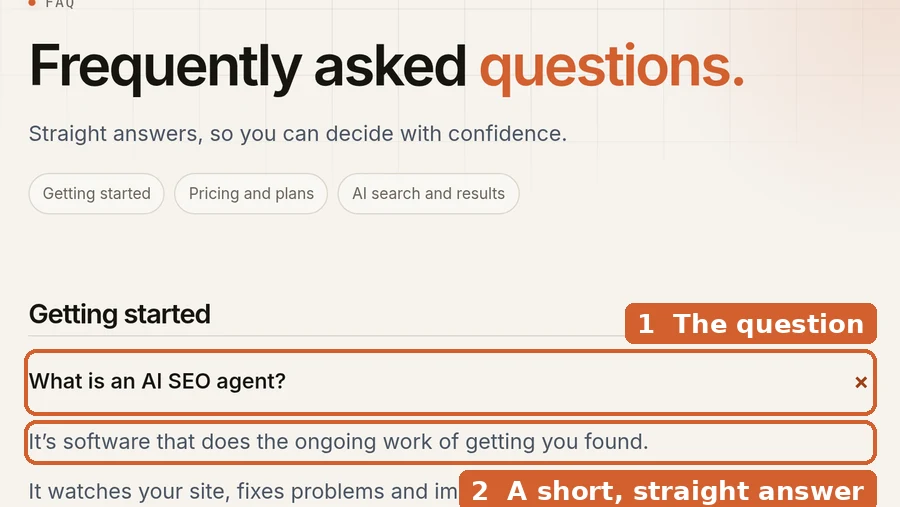
Got your answers on the page? Now add the label.
Then add the FAQ code: make it free in a minute
The quickest way is our free FAQ schema generator. No sign-up, and nothing you type leaves your browser.
Type each question and answer, exactly as they read on your page. The code writes itself as you type.
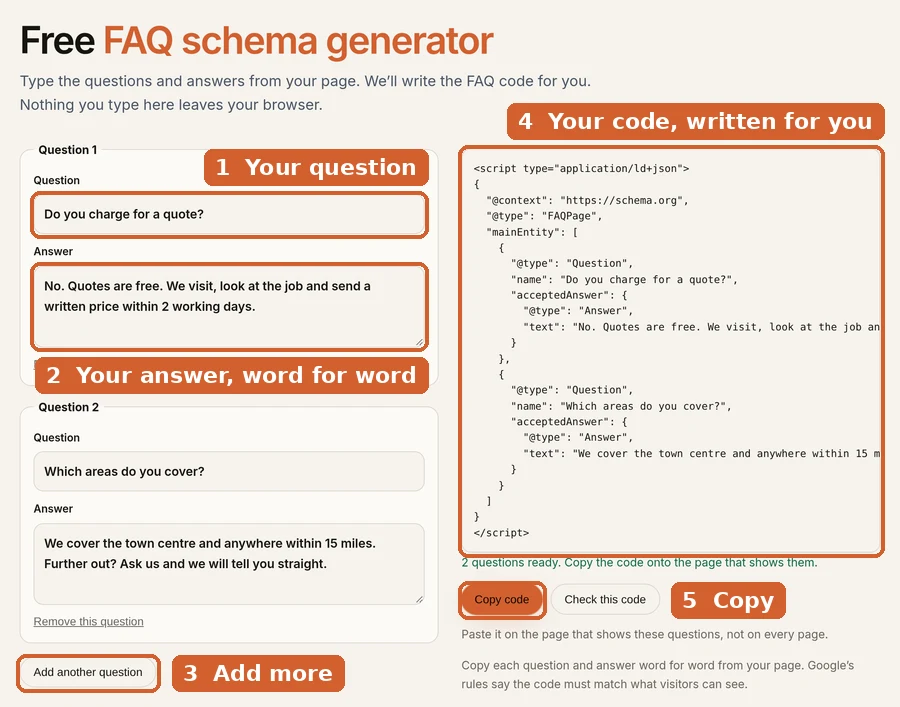
Rather see the code first? Here's what it looks like, for a made-up plumber. Swap in your own questions and answers.
<script type="application/ld+json">
{
  "@context": "https://schema.org",
  "@type": "FAQPage",
  "mainEntity": [
    {
      "@type": "Question",
      "name": "Do you charge for a quote?",
      "acceptedAnswer": {
        "@type": "Answer",
        "text": "No. Quotes are free. We visit, look at the job and send a written price within 2 working days."
      }
    },
    {
      "@type": "Question",
      "name": "Which areas do you cover?",
      "acceptedAnswer": {
        "@type": "Answer",
        "text": "We cover the town centre and anywhere within 15 miles. Further out? Ask us and we will tell you straight."
      }
    },
    {
      "@type": "Question",
      "name": "Do you work weekends?",
      "acceptedAnswer": {
        "@type": "Answer",
        "text": "Yes, on Saturdays from 8am to 1pm. For emergencies we answer the phone 7 days a week."
      }
    }
  ]
}
</script>
Swap these:
"name": your question, exactly as it reads on the page."text": your answer, word for word from the page.- Need more questions? Copy one whole
{ ... }block. Keep a comma between blocks, but not after the last one. (Or let the generator do it.)
Where it goes: on the page that shows the questions. Not on every page.
On WordPress, Wix or Squarespace, paste it into that page's "custom code" or "header code" box.
For your web person: the technical notes
- Type:
FAQPagewithmainEntityas an array ofQuestion, each withnameandacceptedAnswer(Answerwithtext). - JSON-LD in the page
<head>or<body>. OneFAQPageblock per page. textcan contain simple HTML (links, lists), but plain text is safest.- Questions and answers must be visible on the page. Collapsed
<details>sections are fine, as long as visitors can open them. - For questions answered by different users (forums),
QAPageis the right type, notFAQPage. - Full property list: the FAQ page type on schema.org.
Pasted it in? Let's make sure it works.
Check it in a minute with our free checker
Used our generator? Press "Check this code" under it and we'll check it for you.
Copied it by hand? Go to our free schema checker. Choose "Paste code".
Paste your code and press "Check code". No sign-up.
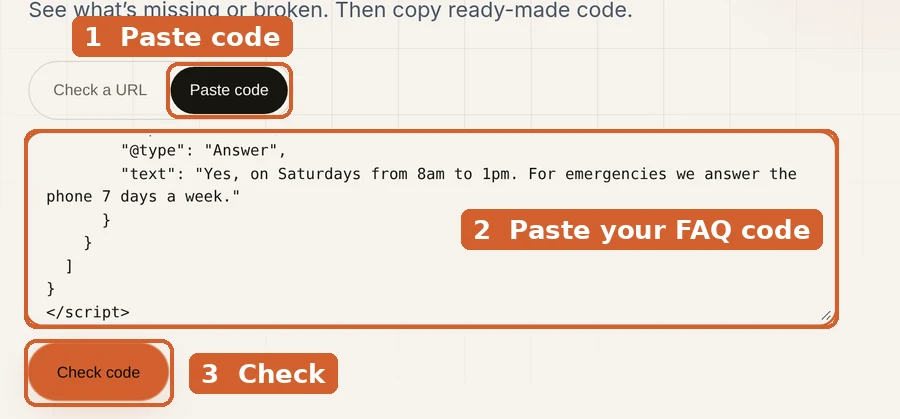
You want 0 errors and a green "Looks good".
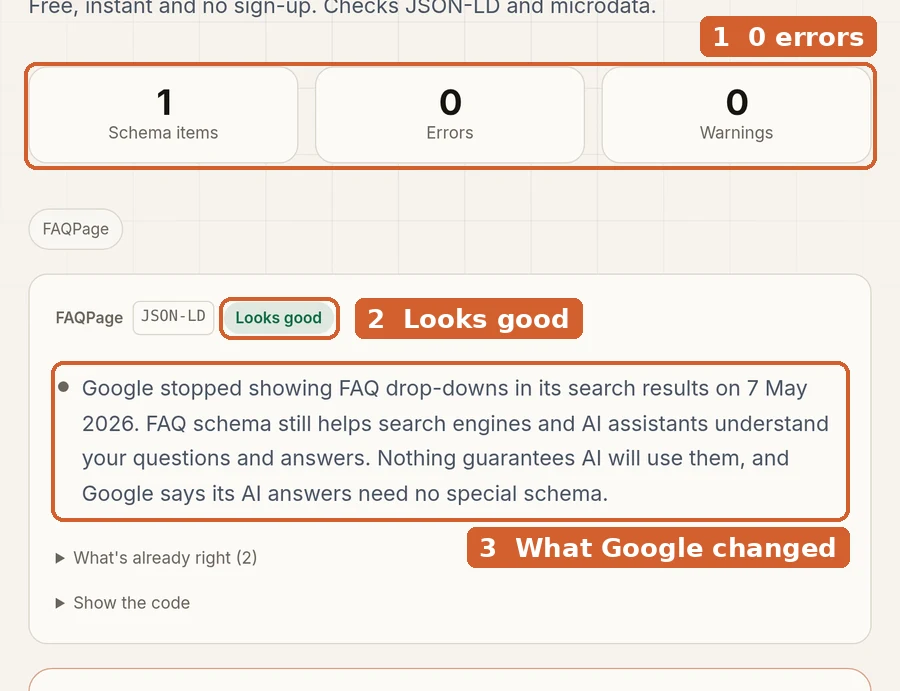
Already live? Use "Check a URL" instead and type in the page address.
Red error? It's nearly always a missing comma or quote mark.
Copy our example again and swap more carefully, or use the generator so the commas are done for you.
One last rule matters more than the code.
Keep the code and the page saying the same thing
Google's rules for this kind of code are simple: "Don't mark up content that is not visible to readers of the page."
So every question in the code must be on the page. Every answer must match.
Changed a price on the page? Change it in the code too.
Easy to forget. Put a reminder in your diary for once every 3 months.
Quick answers
Is FAQ schema still worth adding?
Yes, as a small extra. It's free and takes 10 minutes. Just don't expect it to change your Google listing.
Will it get me into ChatGPT or Google's AI answers?
No one can promise that. Clear answers on the page matter far more.
Do I need an FAQ page, or can I put questions on my homepage?
Either works. A few key questions on your homepage and service pages, plus a full FAQ page, is a good mix.
How many questions should I add?
Start with 5. Add more when customers keep asking something new.
What other code should my site have?
Your business details matter most. Our schema markup guide covers the other 3 types, with code. More guides like this are on our blog.
Rather we did it for you?
Our AI SEO agent checks your site every week. It spots missing or broken code like this and fixes it.
On our Growth plan, it also writes clear answers to the questions your customers ask.
A specialist reviews every change.
Plans start at £400 a month, with no long contract. See our plans.
Or start free. Make your FAQ code now.