Home › Blog › Blocking ChatGPT
Guide · October 2026Is your website blocking ChatGPT? How to check
Someone asks ChatGPT for a good plumber nearby.
ChatGPT goes off and reads websites. Then it answers.
If your website turns it away at the door, you're much harder to pick.
Most websites let it in. A few don't, and it's easy to miss.
Here's how to check yours. It's free and takes a couple of minutes.
The short version
- AI assistants like ChatGPT, Claude and Perplexity send "bots" to read websites.
- A rules file on your site, or a security setting, can turn those bots away.
- It's rare. In our study of 3,671 UK small business homepages, only 0.4% had rules blocking them.
- Check yours free with our AI readiness checker. Look for green ticks under "Can AI find you?".
AI has to read your website before it can recommend you
ChatGPT doesn't know your opening hours by magic.
It sends a bot to your site to read the page. A bot is just a piece of software that visits websites.
Each AI company has its own bots, each with a name.
ChatGPT's search bot is called OAI-SearchBot. Perplexity's is PerplexityBot.
If the bot can't get in, it can't read you. So it's far less likely to quote you or link to you.
So how many websites are shutting the door?
Most small business websites let AI in
Good news first.
In our UK Small Business AI Readiness Study, we checked 3,671 homepages.
Only 0.4% had rules turning away the bots AI assistants use.
That's about 1 site in 250.
One honest catch. Sites whose security turned our research bot away weren't counted.
So we can't say how often that kind of block happens.
The full details are on our method page.
So it's rare. But it's easy to miss, so it's worth a two-minute check.
Two things can lock AI out without you knowing
1. Your site's rules file.
Most websites have a small text file called robots.txt. It tells visiting bots where they can go.
A plugin, a theme or a past web designer may have added "keep out" lines.
Some website builders have a tick box that adds them for you.
2. A security setting.
Some security services can block AI bots with one switch.
Cloudflare, a security and speed service, has settings to block AI bots.
From 15 September 2026, for new websites, it blocks some AI bots by default. But only on pages that show ads.
Google says it plainly. Its guide to AI in Search tells site owners to make sure crawling is allowed "in robots.txt, and by any CDN or hosting infrastructure".
(A CDN is a service like Cloudflare that sits in front of your website.)
So, is either one blocking you?
Check yours in a minute with our free checker
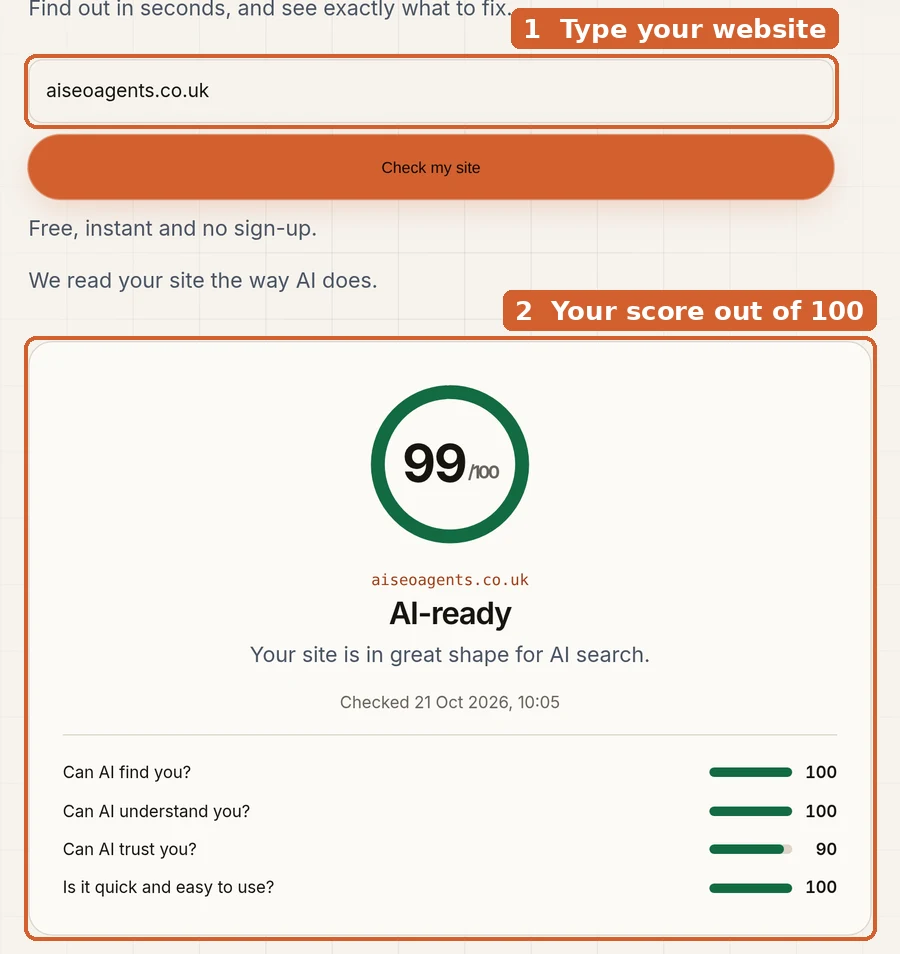
Go to our free AI readiness checker.
Type in your website address. Press "Check my site".
You get a score out of 100 in a few seconds. No sign-up.
Now scroll to "Everything we checked". Look at "Can AI find you?".
If everything passed, tap "Show" to see the list.
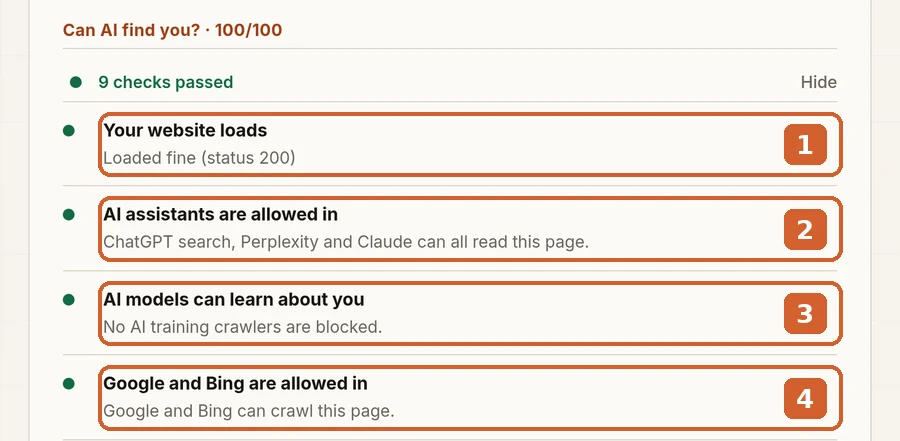
Here's what each line means:
1. Your website loads. If your security turns our checker away, you'll see it here.
2. AI assistants are allowed in. ChatGPT search, Perplexity and Claude.
This is the big one. Red here means fix it first.
3. AI models can learn about you. The bots AI companies use for training.
A warning here is a choice, not a fault. More on that below.
4. Google and Bing are allowed in. Many AI answers start from search results. Blocked here hurts twice.
One limit, to be straight with you.
Our checker reads your rules file and loads your page. It can't see inside your security settings.
Use Cloudflare? Check its AI bot settings too. Or ask whoever set it up.
Want to see the rules with your own eyes? That's easy too.
Or look at your rules file yourself
Type your website address, then add /robots.txt on the end.
For example: yourbusiness.co.uk/robots.txt.
Here's ours.
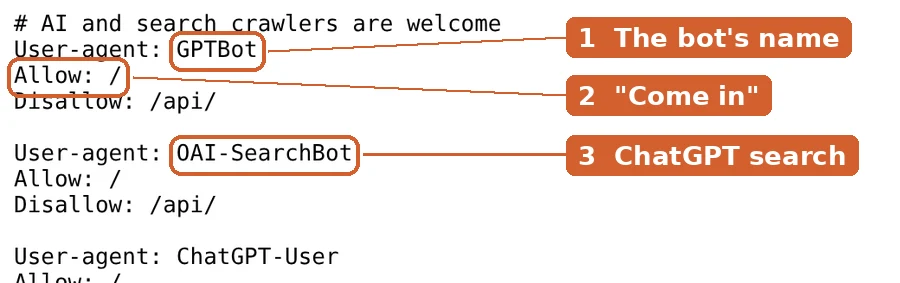
Each group starts with a bot's name. The lines under it are the rules for that bot.
Allow: / means "come in".
This is what a block looks like:
User-agent: OAI-SearchBot
Disallow: /
Disallow: / means "keep out of every page". That one shuts out ChatGPT search.
Watch out for this one too:
User-agent: *
Disallow: /
The star means every bot. That blocks Google as well. Fix it today.
Get a "page not found" instead? That's fine. No file means nothing is blocked.
Found some AI names with "keep out"? Don't panic. It depends which ones.
Blocking AI training is your call
Some bots read websites to teach future AI models. That's called training.
Some owners block these on purpose. That's a fair choice.
The main training bots:
| Bot name | Whose it is | What it does |
|---|---|---|
GPTBot | OpenAI | Collects pages that may train future ChatGPT models |
ClaudeBot | Anthropic | Collects pages that may train future Claude models |
Google-Extended | Controls whether Gemini can use your pages |
Blocking these doesn't take you out of Google.
Google says Google-Extended doesn't affect Google Search at all.
OpenAI says its bots are set separately.
You can block training and still be found in ChatGPT search.
The next group is different.
Blocking AI assistants is the one that costs you
These bots fetch pages when someone is asking for a recommendation.
| Bot name | Whose it is | Block it and… |
|---|---|---|
OAI-SearchBot | ChatGPT search | OpenAI says you won't be shown in ChatGPT search answers |
PerplexityBot | Perplexity | Perplexity says to allow it if you want to show up in its results |
Claude-SearchBot | Claude | Anthropic says it may reduce your visibility |
Googlebot | Google can't read your pages, for Search or its AI Overviews |
Want customers to find you through AI? Let these in.
Sources: OpenAI, Perplexity, Anthropic and Google.
For your web person: the full list of AI bot names
These are the names as each company publishes them (checked 21 Oct 2026).
| Name in robots.txt | Company | Used for |
|---|---|---|
OAI-SearchBot | OpenAI | ChatGPT search results |
GPTBot | OpenAI | Training |
ChatGPT-User | OpenAI | Visits a page when a ChatGPT user asks. OpenAI says robots.txt rules may not apply |
Claude-SearchBot | Anthropic | Claude search results |
ClaudeBot | Anthropic | Training |
Claude-User | Anthropic | Visits a page when a Claude user asks |
PerplexityBot | Perplexity | Perplexity search results. Not used for training |
Perplexity-User | Perplexity | Visits a page when a user asks. Perplexity says it generally ignores robots.txt |
Google-Extended | Gemini training and grounding. No effect on Google Search | |
Googlebot | Google Search, including AI Overviews and AI Mode |
Firewalls: Perplexity publishes steps and IP lists for allowing its bots through a firewall. OpenAI publishes IP lists on its bots page.
Cloudflare: AI bot rules live under Security Settings, "Configure AI bot policies". The managed robots.txt option can add "Disallow" lines for GPTBot, ClaudeBot, Google-Extended and others.
Found a block you don't want? Here's the fix.
Fixing a block is usually a quick job
If it's your rules file: delete the Disallow: / line under each AI assistant you want back in.
Where to do it depends on your website builder.
Squarespace: go to Settings, then Crawlers. Untick "Block known artificial intelligence crawlers".
It's off unless someone switched it on. (Squarespace's guide)
Wix: in your dashboard's SEO section, open Tools and settings, then Robots.txt Editor.
"Reset to Default" undoes past changes. (Wix's guide)
WordPress: some SEO plugins have a robots.txt editor. Or your web host can change the file.
If it's a security setting: ask whoever set it up to allow the AI assistant bots.
Not sure? Send your web person this page. It's a quick job for them.
Then give it a day.
Check again in a day, then forget about it
OpenAI and Perplexity both say changes can take about 24 hours to be picked up.
So run our checker again tomorrow.
All green under "Can AI find you?"? You're done.
Check again whenever you change website builder, add a security service or redesign your site.
Quick answers
Is it wrong to block ChatGPT?
No. It's your website and your choice. Just make it on purpose.
Will letting AI in get me recommended?
No one can promise that. Being let in is step one.
AI also needs to know who you are and what you do. Our schema markup guide covers that.
I block training bots. Will ChatGPT still find me?
It can. OpenAI says GPTBot and OAI-SearchBot are separate settings.
Does the checker cost anything?
No. It's free, with no sign-up.
Rather we did it for you?
Our AI SEO agent checks your site every week. It spots blocks like these and fixes them.
A specialist reviews every change.
Plans start at £400 a month, with no long contract. See our plans.
Or start free. Check your website now.