Home › Blog › Bing Webmaster Tools
Guide · November 2026Bing Webmaster Tools: the 10-minute setup that helps you show up in ChatGPT search
 By Ben Hughes · 5 November 2026 · 9 min read
Bing is easy to ignore.
But your customers may be using it without knowing.
Microsoft says Bing powers "AI tools like ChatGPT", plus Yahoo and DuckDuckGo.
So if Bing can't find your website, those tools may not find it either.
Bing Webmaster Tools is how you check. It's free.
Here's the whole setup, step by step. Allow about 10 minutes.
The short version
- Bing Webmaster Tools is Microsoft's free tool for website owners. It shows you what Bing knows about your site.
- Already use Google Search Console? Import your site in a few clicks. No code.
- Then give Bing your list of pages (your sitemap).
- Check ChatGPT's own search bot is allowed in too. Bing alone isn't enough.
- Nobody can promise you'll be recommended. This just makes sure you can be.
Bing quietly feeds ChatGPT, Copilot and more
When someone asks ChatGPT a question, it may search the web first.
OpenAI says ChatGPT search "sometimes partners with other search providers". The privacy policy it links to for that is Microsoft's.
For business and school accounts, OpenAI names it outright. ChatGPT sends searches to "the Bing search engine".
Microsoft puts it more simply: Bing powers "AI tools like ChatGPT".
Then there's Copilot, Microsoft's own AI assistant. Bing Webmaster Tools even shows when Copilot quotes you.
One honest catch. Bing is not the only way into ChatGPT. OpenAI also runs its own search bot. We cover that in step 5.
So Bing matters more than its size suggests. Here's how to get in.
The setup is free and takes about 10 minutes
Bing Webmaster Tools is Microsoft's free dashboard for website owners. Some people call it Bing Search Console, because it's Bing's version of Google's tool.
It tells you:
- whether Bing has your pages on its list (that list is called its "index")
- which searches you show up for
- any problems stopping Bing reading your site
- how often Copilot and Bing's AI answers quote your pages
If you already use Google Search Console, it's even quicker.
Ready? Open a new tab.
Step 1: sign in with an account you already have
Go to bing.com/webmasters.
Bing lets you sign in with a Microsoft, Google or Facebook account. No new password needed.
Using Google Search Console already? Sign in with that same Google account. It makes step 2 easier.
Signed in? You'll be asked to add your website.
Step 2: import your site from Google Search Console
This is the fastest route.
Google Search Console is Google's version of this tool. If your site is already set up there, Bing can copy it across.
Bing shows a screen headed Select one of the methods to add your site. Don't see it? Open the site menu at the top left (Select website) and click + Add a site.
On the Google Search Console side, choose Import your sites from GSC. (GSC is short for Google Search Console.) Click Import.
Bing asks permission to read your Search Console account. Say yes.
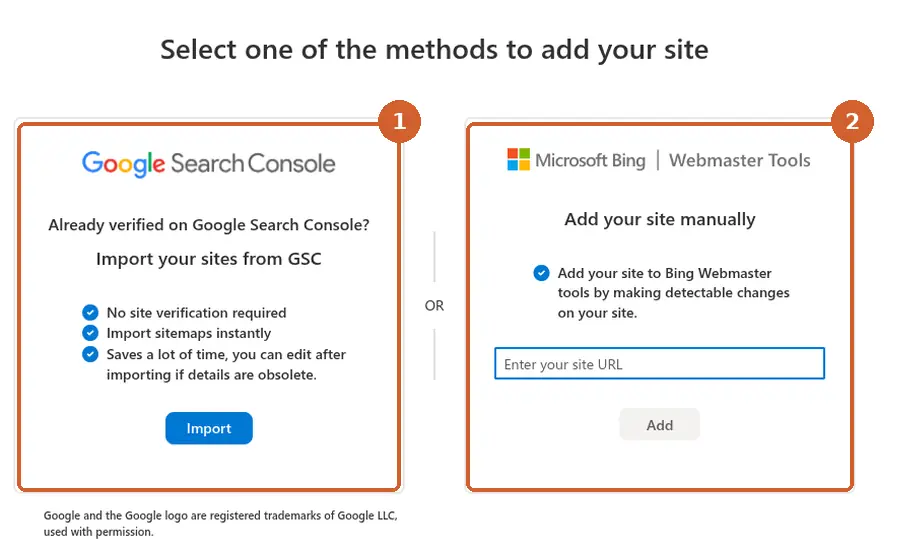
You'll see a list of your sites. Tick yours, then confirm the import.
That's it. Bing says imported sites are "automatically verified". That means Bing accepts the site is yours.
It brings your list of pages across too, if Search Console has one.
Worried about giving access? You can switch it off later under Profile, then Disconnect.
Not on Search Console? There's another way.
No Search Console? Add your site by hand
Type your website address into Add your site manually, then click Add.
Now Bing needs proof the site is yours. It offers a few ways:
1. Let Bing do it for you. If your domain company supports it, Bing logs in there and adds the setting itself. (Your domain company is wherever you bought your web address.)
2. Add a record to your domain settings. Bing gives you a short code. You paste it into your domain company's settings. This is what we did for our own site.
3. Upload a small file to your website.
4. Paste a line of code into your homepage.
Not sure which? Pick option 1 if you see it. Otherwise send this page to whoever looks after your website.
They'll know what "a CNAME record" is. It's usually a quick job for them.
Then click Verify. Once Bing can see the record, you're in.
Next, tell Bing what pages you have.
Step 3: give Bing your list of pages
A sitemap is a simple list of every page on your website. It's made for search engines, not people.
You almost certainly have one already. Most website builders make it for you:
| Website builder | Where your sitemap usually lives |
|---|---|
| Wix | yourbusiness.co.uk/sitemap.xml |
| Squarespace | yourbusiness.co.uk/sitemap.xml |
| Shopify | yourbusiness.co.uk/sitemap.xml |
| WordPress (no SEO plugin) | yourbusiness.co.uk/wp-sitemap.xml |
Using an SEO plugin on WordPress? It may use a different address. The plugin's settings will show it.
Type the address into your browser. A page full of web addresses means you've found it.
Imported from Search Console in step 2? Your sitemap may already be there. Check anyway.
In Bing Webmaster Tools, open Sitemaps. Click Submit sitemap at the top right.
Paste in the full address, starting https://. Click Submit.
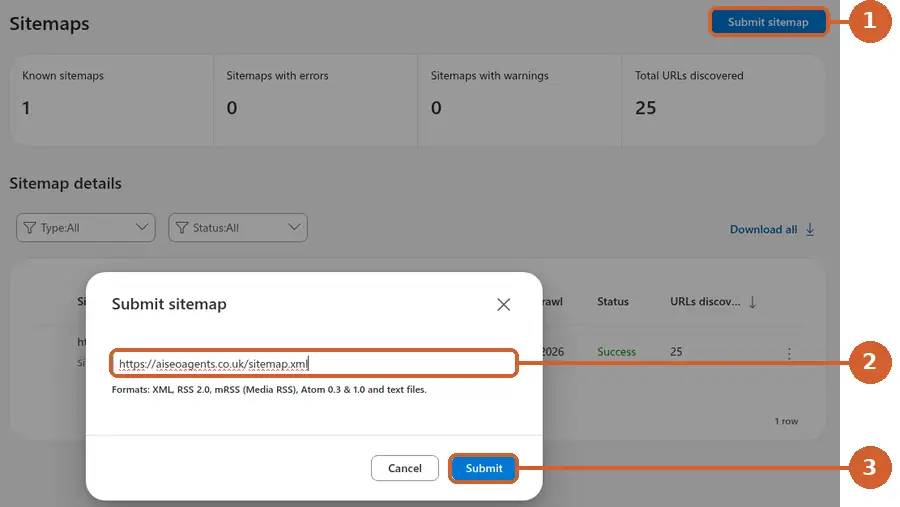
Bing says it tries to read it straight away. Then it comes back at least once a day.
You want the status to say Success. Ours does.
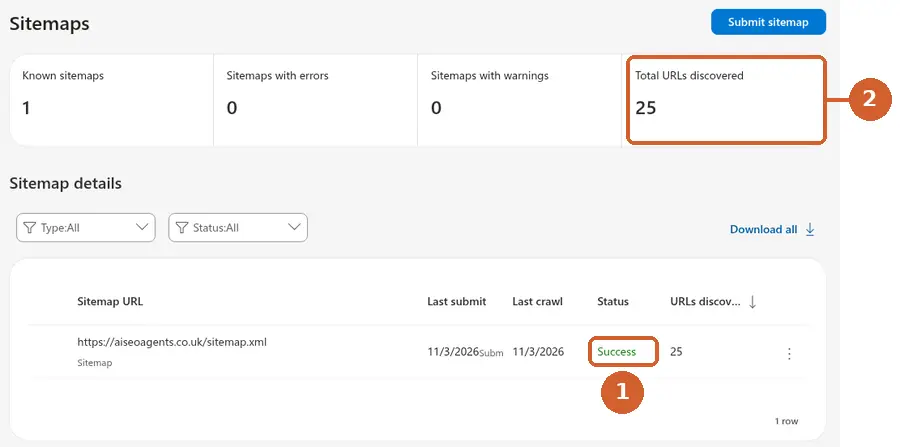
"URLs discovered" is how many pages Bing found on your list. It's not a promise they'll all appear in Bing.
Now check Bing can actually read them.
Step 4: check Bing can read your homepage
Open URL Inspection in the menu.
Paste in your homepage address and click Inspect.
You'll see two tabs:
- Bing Index tells you whether the page is on Bing's list. If it isn't, it tells you why.
- Live URL shows what Bing sees on the page right now. Handy after a website change.
Page not on the list yet? That can happen on a new site, even when your sitemap says Success. Your sitemap tells Bing the page exists. Bing still has to visit it.
Click Request indexing. That asks Bing to come and look. Then check again in a few days.
Do the same for your most important page. For most businesses that's the main service page.
Now for the part most guides skip.
Step 5: make sure ChatGPT's own bot is let in
Bing is one route into ChatGPT. It isn't the only one.
OpenAI sends its own search bot to read websites. It's called OAI-SearchBot. (A bot is just software that visits web pages.)
OpenAI says to be included, sites should allow OAI-SearchBot. And your host or security service must let it through.
Block it, and OpenAI says your site won't be shown in ChatGPT search answers.
So check both:
- Bing's bot. Bing Webmaster Tools has a robots.txt Tester. You'll find it in the menu under TOOLS & ENHANCEMENTS. Robots.txt is the small rules file that tells bots where they can go.
- ChatGPT's bot. Our free AI readiness checker shows it in a minute. Look for green ticks under "Can AI find you?".
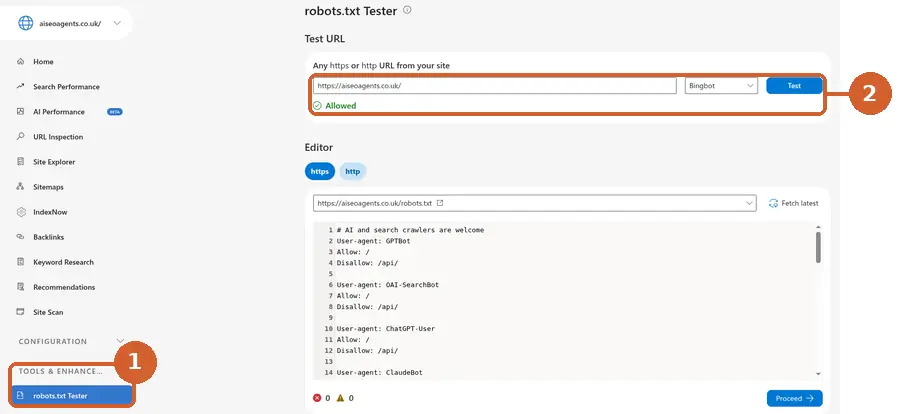
Found a block? Our guide Is your website blocking ChatGPT? shows how to fix it, website builder by website builder.
One more step, and it's optional.
Step 6 (optional): tell Bing the moment you change a page
Normally, Bing finds changes when it next visits.
IndexNow is a faster way. Your website pings Bing the moment you add, change or remove a page.
It's shared, too. Search engines that use IndexNow pass your update to each other.
You may have it already. Bing says some website builders support it, naming Shopify, Wix and Duda.
On WordPress, Bing lists plugins that do it. These include its own IndexNow plugin, Yoast, Rank Math, AIOSEO and SEOPress.
On Cloudflare? Bing points you to a setting called Crawler Hints.
To see if it's working, open IndexNow in the Bing Webmaster Tools menu.
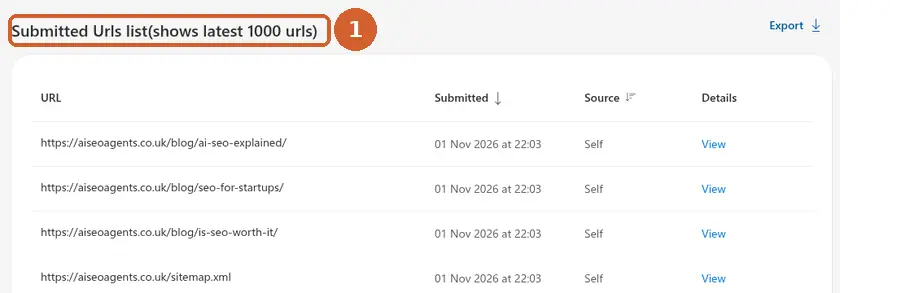
We use IndexNow on our own site. Every new guide pings Bing the day it goes live.
One thing it won't do: Bing says IndexNow doesn't guarantee a page gets on its list. It just makes sure Bing knows.
That's the setup done. Now give it time.
Look again in a few days
Bing says it usually takes about 48 hours to build your first reports.
It can't show anything from before you signed up. So the sooner you start, the more you'll see later.
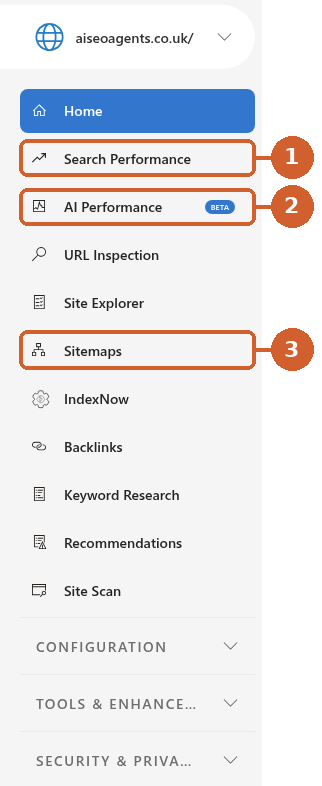
When you come back, look at three things:
1. Search Performance. How often you showed up on Bing, and how often people clicked.
It counts links shown in Bing's AI chat answers as well as normal results.
2. AI Performance (marked BETA in the menu). How often Copilot and Bing's AI summaries quote your pages as a source. It also shows which pages.
Microsoft says these figures are a sample, not a full count. Treat them as a trend.
3. Sitemaps. Still saying Success? Good.
After that, we'd look once a month.
What Bing Webmaster Tools can't do
It can't make Bing or ChatGPT recommend you.
OpenAI says placement in ChatGPT search "is not guaranteed".
Microsoft says its AI Performance report doesn't measure rankings. It just shows which pages were quoted.
What it does do is take away a reason not to pick you.
The rest is about what's on your website. AI needs to know who you are, what you do and where.
Our schema markup guide covers that part.
Quick answers
Is Bing Webmaster Tools free?
Yes. Microsoft doesn't charge for it.
Already on Google Search Console? Is this still worth doing?
Yes. They're separate. Google's tool tells you about Google, and Bing's tells you about Bing. The import in step 2 makes it quick.
Not set up on Google yet? Our SEO for startups plan walks you through it.
Will this get me recommended by ChatGPT?
No one can promise that. It makes sure Bing can find you. Step 5 makes sure ChatGPT's own bot can too.
Does Bing get my Google password?
No. You give Bing permission to read your Search Console data. You can take it back any time under Profile.
How long until anything shows up?
Bing says about 48 hours for the first reports. Searches and AI quotes take longer to build up.
Does every new page need submitting?
No. Your sitemap and IndexNow do that for you. Bing says sending the same page again and again won't speed things up.
Rather we did it for you?
Our AI SEO agent checks your site every week.
It makes sure Bing, Google and AI tools can find and read your pages, and fixes what stops them.
A specialist approves every change. See how it works.
The Core plan is £400 a month plus VAT.
Cancel any time, with 30 days' notice. See our plans.
Or start free. Run the AI readiness checker.
More guides for business owners are on our blog.