Home › Blog › SEO for startups
Guide · October 2026SEO for startups: a 90-day plan for your new business
You've opened the doors. The website is live.
Now you want people to find it on Google.
SEO just means getting found when people search.
Here's what to do in your first 90 days. In order. Mostly free.
The short version
- Google can find a new website by itself. Customers take longer.
- Days 1–30: make sure Google can get in.
- Days 31–60: tell Google and AI who you are.
- Days 61–90: get people talking about you.
- Skip the old tricks. Google says they do little or nothing.
- Some changes take hours, others months. Plan for months.
Google can find a new site fast, but customers take longer
Good news first.
Google's starter guide says it finds most websites by itself.
"You usually don't need to do anything except publish your site on the web."
But being found by Google and being found by customers are different things.
We know because we're a new business too.
Our website went live on 18 October 2026.
Two days later, Google started showing it in searches.
Here's our first week, straight from Google's own Search Console.
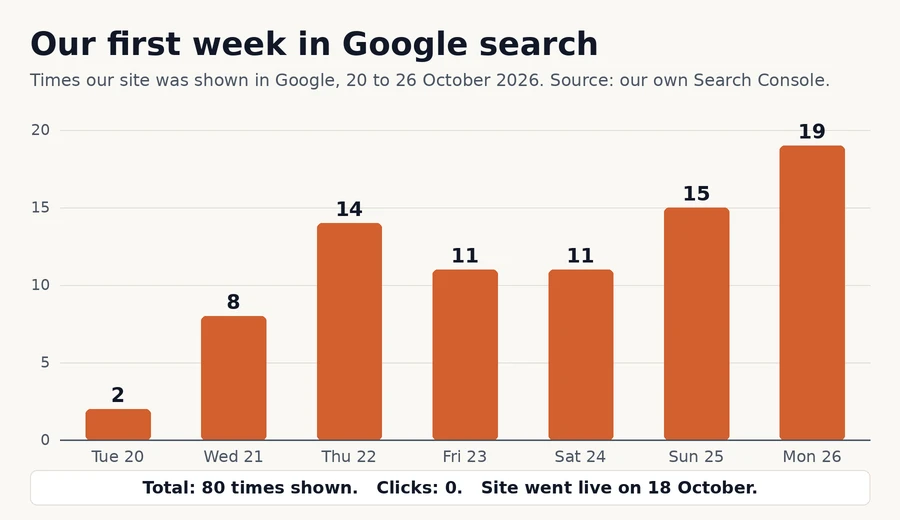
Shown 80 times. Clicked 0 times.
By 27 October, Google had 20 of our 21 pages on its list.
The 21st went live the day before.
So Google finds you quickly. Customers clicking takes patience.
Google's guide says some changes take hours.
Others "could take several months".
That's why this plan runs for 90 days, not 9.
Days 1–30: make sure Google can get in
Month one is about the doors and windows.
Nothing fancy. Just make sure nothing is locked.
Step 1: Check nothing is blocking Google or AI
Some websites turn away the bots AI assistants use.
Our study of 3,671 UK small business homepages found 0.4% doing it.
Rare. But a disaster if it's you.
Run our free AI readiness checker. It takes about a minute.
Here it is on our own website.
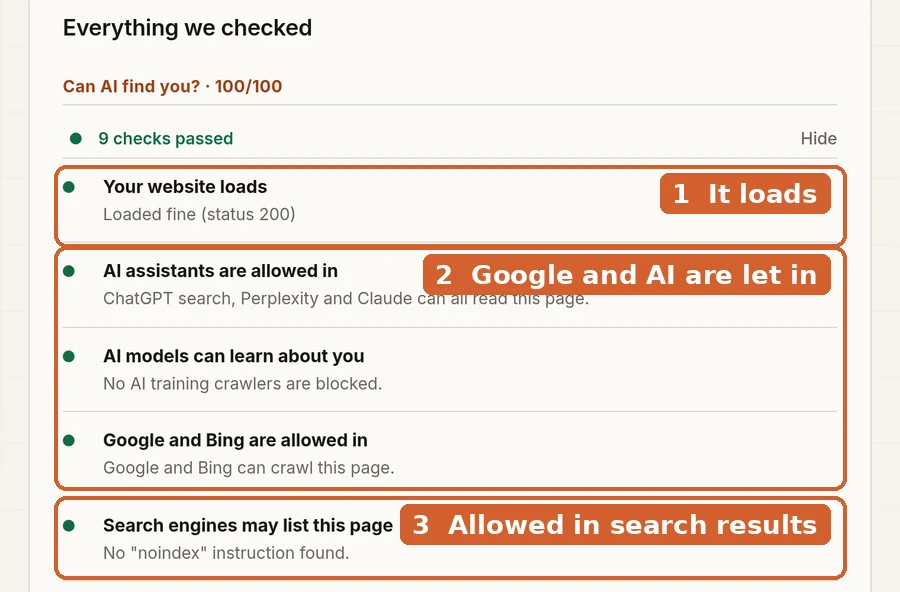
All green? Good. Move on.
Anything red? Fix that first. Our blocking guide shows how.
Step 2: Set up Google Search Console
Search Console is Google's own tool for website owners.
It shows when Google finds your pages, and how often you're shown.
Google's getting started guide has four steps.
1. Prove the website is yours.
2. Check Google can find and read your pages.
3. Send Google a list of your pages. It "might speed up" discovery.
4. Watch your numbers. How often you're shown, and how often you're clicked.
Our chart above came from exactly this tool.
Step 3: Give every page a clear title
The title is the blue headline people see in Google.
Google's advice on titles is short.
Make each title unique, clear and to the point.
"Home" is not a title. "Emergency plumber in Leeds | Smith & Sons" is.
Step 4: Claim your free Google Business Profile
Serve customers face to face, or in an area?
Then claim your Business Profile. It puts you on Google Search and Maps.
Google says you can add or claim it "at no charge".
Not every business qualifies. Google's page explains who can.
That's the doors open. Next, tell Google who's inside.
Days 31–60: tell Google and AI who you are
By now, Google can get in.
Month two is about making sure it understands it.
Step 5: Add your business details in code
Your name, address and hours can sit in a hidden block of code.
People don't see it. Google and AI read it.
Run our free schema checker to see what's there.
Here's our own homepage.
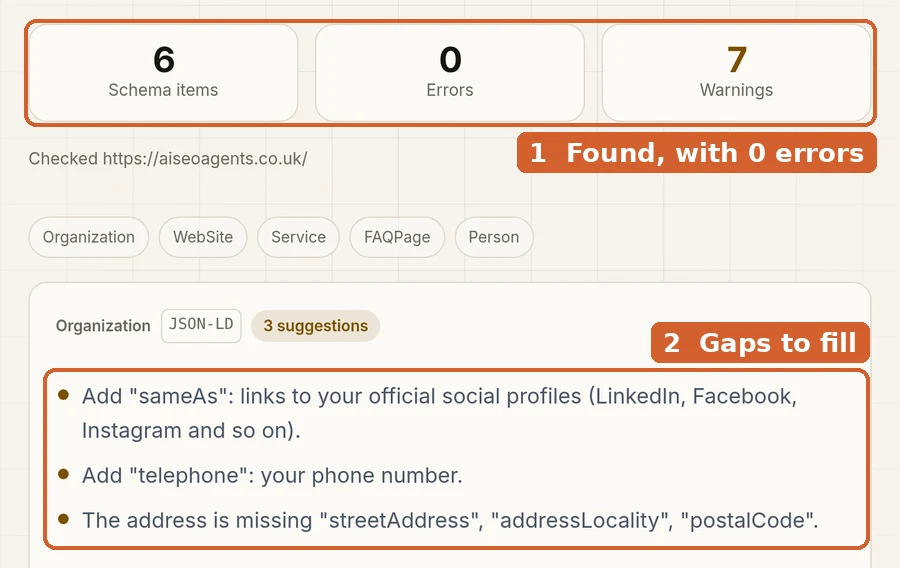
Even we have gaps. That's normal on a new site.
Nothing there yet? Our schema guide has copy-paste code.
Step 6: Use the words your customers use
You might say "charcuterie". Your customers might type "cheese board".
That's Google's own example, from its starter guide.
Write each page in your customers' words, not your trade's.
We'd also give each main thing you sell its own clear page.
Step 7: Answer the questions customers ask
Write down the 5 questions you hear most.
Price. Area. How long. What's included. What happens next.
Answer each in a sentence or two, on your website.
Then our free FAQ generator writes the code for you.
Here it is with two real questions from our own FAQ page.
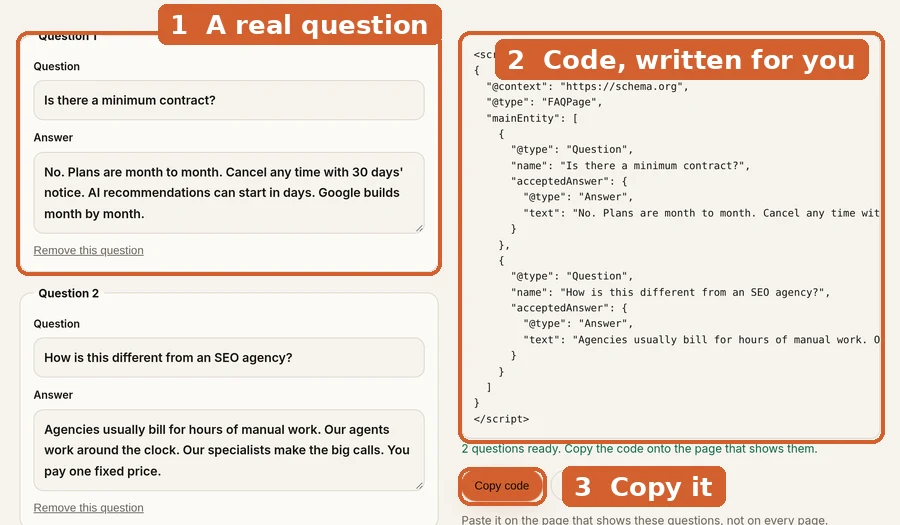
Our FAQ guide walks you through it.
That's who you are, covered. Now help people hear about you.
Days 61–90: give people a reason to talk about you
Google finds most new pages by following links.
Often, those links are on other websites.
Those come "naturally over time", says Google's starter guide.
You can speed that up by telling people you exist.
Step 8: Tell people, the old-fashioned way
Google lists social media, community groups, adverts and word of mouth.
It calls word of mouth "one of the most effective and lasting ways".
So:
- Put your web address everywhere. Cards, invoices, van, shop window.
- Ask happy customers to tell a friend.
- Join local groups. Help first. Sell second.
- Email past customers about new things. Only with their permission.
Step 9: Check your numbers once a month
Google says there is "no need to sign in to the tool every day".
Once a month is fine. Look at three things:
1. Pages on Google's list. Are new pages getting found?
2. Times shown. Is it growing?
3. Clicks. Are people choosing you?
Then add a fourth number of your own: enquiries.
That's the plan. Now, what to leave out.
Five things to skip in your first 90 days
Most come straight from Google.
1. A keyword tag. "Google Search doesn't use the keywords meta tag."
2. A magic word count. Google says there's "no magical word count target".
3. A domain stuffed with keywords. Google says it has "hardly any effect".
4. "We'll list you on thousands of search engines."
Google calls this useless.
5. A promise of top spot.
"No one can guarantee a #1 ranking on Google."
Spend that time on steps 1 to 9 instead.
So how do you know it's working?
What good looks like on day 90
Be honest with yourself here.
On day 90, you're looking for direction, not fireworks.
- Most of your pages are on Google's list. Search Console shows this.
- You're shown more often than in month one.
- A few clicks are starting to come in.
- Your business details have no errors in our schema checker.
Our own first week: shown 80 times, 0 clicks.
That's a start, not a result.
Wondering where AI fits in? Our AI SEO guide covers what it can and can't do.
For your web person: the technical notes
- Check indexing with a
site:yourdomain.co.uksearch, or URL Inspection in Search Console (Google). - A sitemap isn't required, but submitting one in Search Console "might speed up your site's discovery" (Google).
- Make sure robots.txt, hosting or CDN bot settings and any
noindexleft over from the build don't block Google, Bing or AI search bots. Our blocking guide covers each one. - Give every page a unique
<title>and a short, unique meta description. - Add
OrganizationorLocalBusinessJSON-LD with name, URL, logo, contact details and social profile links. FAQ JSON-LD only on pages that show those questions. - An llms.txt file is optional. Google doesn't need one. See our llms.txt guide.
Quick answers
What is SEO for startups?
Getting a new business found on Google, in its first months.
How long does SEO take for a new website?
Google says some changes take hours, others several months.
Our site was shown in Google 2 days after launch. Clicks take longer.
Do you need to pay for SEO at the start?
No. Google says "it costs nothing to appear" in its normal results.
You pay to save time, or to have it done every week.
Should you hire someone at launch?
Google says a great time to hire is when you're "planning to launch a new site".
Doing it yourself is fine too. This plan shows how.
What should you do first?
Check nothing is blocking Google. Our free checker does it in a minute.
Rather we did it for you?
Our AI SEO agent runs this plan for you, and keeps going after day 90.
It checks your site every week. A specialist approves every change.
See how it works.
The Core plan is £400 a month plus VAT.
Cancel any time, with 30 days' notice. See our plans.
Or start free. Run the AI readiness checker.
More guides for business owners are on our blog.