Home › Blog › SEO report template
Guide · October 2026Free SEO report template (plus what a good monthly report should show)
Paying someone for SEO? You should get a report every month.
But most reports are hard to read. Charts, scores, words you don't use.
So here's ours. Free. One page. No email needed.
And below it, how to read any SEO report in five minutes.
The short version
- A good report answers one thing: is it bringing customers?
- Start with enquiries and calls. Google numbers come second.
- Compare with the same month last year, not just last month.
- Every report should list the work done and the plan for next month.
- Watch for 7 red flags. We list them below.
A good SEO report answers one question
Is it bringing you customers?
That's it. Everything else is detail.
A report full of charts can still dodge that question.
Google lists questions to ask anyone you hire for SEO. One of them:
"How do you measure your success?"
The answer should be in every report. In words you understand.
So our template puts that answer first.
Get the free template here
Free monthly SEO report template
One page. Eight short sections. No email needed.
Two sheets: one blank, one with made-up example figures.
Google Sheets? Go to File, Import, Upload.
It works in Excel and Google Sheets.
It's set up to print on one A4 page.
Here's the filled-in copy.
These are example figures. We made them up.
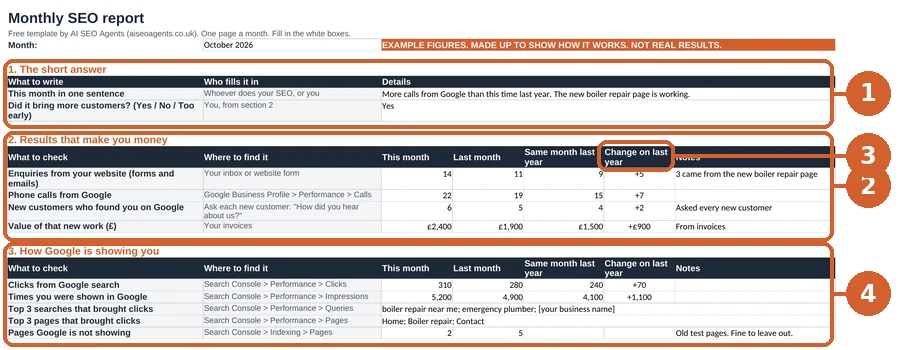
Now let's walk through it, section by section.
Start with the numbers that make you money
This is section 2 of the template. It comes first for a reason.
Fill in four numbers:
- Enquiries from your website. Forms and emails.
- Phone calls from Google.
- New customers who found you on Google.
- What that new work was worth. From your invoices.
Not sure where a customer came from? Ask them.
"How did you hear about us?" works every time.
If these numbers go up, SEO is doing its job.
If they don't, the rest of the report has to explain why.
Is it worth what you pay?
Try our SEO ROI calculator.
Next, the Google numbers.
Then check how Google is showing you
These come from Search Console. It's free, from Google.
Search Console gives you two main numbers.
Clicks. How often people clicked through to your site.
In Google's words:
"The number of times a user clicked your site from Google Search results."
Times you were shown. Google calls these impressions.
Its words: "How many times your site appeared in Search results."
Clicks matter more. Being shown with no clicks pays no bills.
Add three more things:
- The top 3 searches that brought clicks. Would a customer type them?
- The top 3 pages that brought clicks.
- Pages Google isn't showing. A few is normal. A sudden jump isn't.
Searches like "[your trade] near me" are great. Odd phrases nobody types aren't.
Got a Google Business Profile? It has its own numbers.
Add your Google Business Profile if you have one
Your Business Profile is your listing on Google Maps and Search.
It has a free performance report. Copy over:
- Calls from your profile.
- Direction requests.
- Website clicks from your profile.
- New reviews this month.
Google counts a call each time someone taps the call button on your profile.
And directions? "How many people asked for directions to your business."
For a local business, these can matter more than your website.
Now, how to tell if any of it is good news.
Compare with last year, not just last month
Lots of businesses have busy and quiet months.
A garden firm is busier in spring. A heating engineer in winter.
So a drop from last month might be normal.
That's why the template has a column for the same month last year.
It works out the change for you, in the spreadsheet copy.
Up on last year? Good sign. Down? Ask why.
No figures from last year yet? Fill in last month for now.
Numbers only tell half the story. The other half is the work.
Every report should say what was done and what's next
Sections 5 to 8 of the template are just words. No numbers.
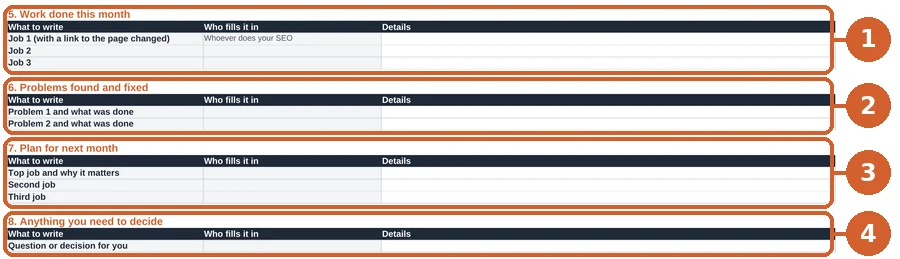
1. Work done this month. Each job, with a link to the page changed.
2. Problems found and fixed. A broken form. A missing page.
3. The plan for next month. The top three jobs, and why.
4. Anything you need to decide. Photos, prices, approvals.
Google suggests asking anyone you hire this:
"Will you share with me all the changes you make to my site"
It also asks for "the reasoning behind them".
A good monthly report does exactly that.
So what does a bad one look like?
Seven red flags in an SEO report
1. No enquiries or customers anywhere.
Only "rankings" and "visibility". Ask how it turns into customers.
2. Rankings for searches nobody types.
Being top for a phrase no customer uses is easy. And worthless.
3. You can't see your own Search Console.
It's your data. You should be the owner.
Google says an owner "Has full control" of it.
Give your SEO person access as a user. Don't hand over ownership.
Letting someone check your site for the first time?
Google says "only grant read access to Search Console".
4. No list of work done.
If you can't see what changed, you can't judge it.
5. Big numbers with nothing to compare them to.
"5,000 people saw you!" Compared with what?
6. Promises of number 1.
Google is clear:
"No one can guarantee a #1 ranking on Google."
7. Lots of new links, and no word on where from.
Google's spam rules ban this:
"Buying or selling links for ranking purposes."
Ask where every link came from.
One more. Google says:
"Be careful if a company is secretive"
Or if it "won't clearly explain what they intend to do".
A report you can't understand counts.
Doing it yourself instead? Here's where to look.
Doing it yourself? Here's where every number lives
You don't need an agency to fill in the template.
- Enquiries. Your inbox or website form.
- Calls and directions. Your Business Profile performance report.
- Clicks and searches. Search Console's Performance report.
- Pages Google isn't showing. Search Console's Pages report.
- New customers. Ask them. Note it down.
New to Search Console?
Our 90-day plan shows how to set it up.
Then run these free checks once a month:
- Can Google and AI read your site? Use our AI readiness checker.
- Does Google know your business details? Run our schema checker.
- Answering customer questions? See our FAQ guide.
How common are these gaps?
See our study of 3,671 small business sites.
Want to know how AI answers fit in? Read our AI SEO guide.
For your web person: filling in the template
- The .xlsx has two sheets: "Monthly report" (blank) and "Example (made up)". The "Change on last year" column is a formula (this month minus the same month last year). The CSV has the same rows with no formulas, for importing anywhere.
- Search Console: Performance > Search results. Set the date to last month, then use Compare for the same month last year. Clicks and Impressions are the two totals. Use the Queries and Pages tabs for the top 3s. Google notes "Many reports provide an export button to download both the chart and table data."
- Pages Google isn't showing: Search Console > Indexing > Pages, the "Why pages aren't indexed" table. Some pages are left out on purpose (redirects, duplicates), so look at the trend, not zero.
- Business Profile: open the profile while signed in, then Performance. Set the date range to last month.
- Enquiries: if you use analytics, mark form sends and phone-number taps as key events, then report those. Otherwise count them from the inbox.
- Access: keep the business as the verified owner of Search Console and the Business Profile. Add any agency as a user.
Quick answers
What should be in a monthly SEO report?
Enquiries and calls first.
Then Google clicks, top searches, the work done and next month's plan.
How often should you get an SEO report?
Once a month is normal. SEO is slow, so weekly reports rarely show much.
Is there a free SEO report template?
Yes. Ours is above. Excel, Google Sheets or CSV. No email needed.
Can you make an SEO report in Google Sheets?
Yes. Download our template, then File, Import, Upload in Google Sheets.
What is a good SEO report example?
One that says, in a sentence, if SEO brought customers.
Our template's example sheet shows one. The figures are made up.
Rather we did it for you?
Our AI SEO agent does the weekly work for you.
It checks your site every week. A specialist approves every change.
See how it works.
The Core plan is £400 a month plus VAT.
Cancel any time, with 30 days' notice. See our plans.
Or start free. Run the AI readiness checker.
More guides for business owners are on our blog.